You’ve probably heard that people make money on Pinterest. But you’re sitting there thinking — is this actually real, or just another internet myth?
Here’s the truth: Pinterest is one of the most underrated platforms for affiliate marketing right now. While everyone else is fighting over Google rankings and YouTube subscribers, a small group of smart people are quietly earning commissions every single month — just by sharing pins.
And the best part? You don’t need a website. You don’t need thousands of followers. You don’t even need to spend a single penny to get started.
In this guide, I’m going to walk you through exactly how Pinterest affiliate marketing works — step by step — so that by the time you finish reading, you’ll know precisely what to do next.
Table of Contents
What Is Pinterest Affiliate Marketing?
Let’s keep this simple.
Pinterest affiliate marketing means you share pins on Pinterest that contain special tracking links. When someone clicks your pin, lands on a product page, and makes a purchase — you earn a commission.
That’s it. No inventory. No customer service. No shipping. You’re just the person who connected a buyer with a product they already wanted.
Here’s how the flow looks in real life:
You create a pin → Someone sees it → They click → They buy → You earn money
The commission could be anywhere from 3% on an Amazon product to 30% or more on a digital tool or SaaS product. It all depends on which affiliate programme you join.
And unlike Instagram or TikTok where your content disappears in 24 hours, a single Pinterest pin can keep bringing in traffic — and commissions — for months or even years.
Why Pinterest in 2026? (Not Instagram, Not TikTok)
This is the question most beginners ask, and it’s a fair one.
Here’s why Pinterest specifically makes sense for affiliate marketing right now:
Pinterest has 500 million monthly active users — and unlike most social platforms, these users are actively looking to buy something. They’re searching for gift ideas, home renovation inspo, beauty routines, travel plans. They come with buying intent already baked in.
75% of weekly Pinterest users are always shopping. That number is staggering. You’re not interrupting someone’s social feed — you’re meeting them exactly where they already want to discover products.
Your pins last 3.5 months on average. Compare that to an Instagram post (48 hours) or a Facebook post (about 5 hours). The same effort you put into creating one pin can keep paying you back long after you’ve forgotten you made it.
Competition is still relatively low. Most affiliate marketers are still focused on Google SEO or YouTube. Pinterest remains underutilised, which means less competition and easier reach — especially for beginners.
This is especially true in the UK, Canada, and Europe where the Pinterest affiliate marketing space is even less crowded than in the US.
Step 1 — Create a Pinterest Business Account
Before you do anything else, you need a Pinterest Business Account. Not a personal one — a business one.
Why does it matter? Because a business account gives you access to Pinterest Analytics (so you can see which pins are actually working), Rich Pins, and it also makes you compliant with Pinterest’s own terms for commercial activity.
The good news: it’s completely free.
How to set it up:
Go to pinterest.com/business/create and sign up directly, or if you already have a personal account, go to Settings and convert it to a business account. It takes about two minutes.
Once you’re in, do these three things straight away:
Write a keyword-rich bio. Don’t write “I love pretty things.” Write something like: “Sharing the best home organisation tools, beauty finds, and money-saving products for busy women in the UK.” That bio tells Pinterest — and your audience — exactly who you are and what you share.
Claim your website (if you have one). If you don’t have a website yet, skip this for now — you can still do affiliate marketing without one.
Enable Rich Pins if you have a website. Rich Pins pull product information directly from the page you’re linking to, which makes your pins look more professional and trustworthy.
Step 2 — Choose Your Niche and Affiliate Programme
This step matters more than most beginners realise. The niche you choose will determine how easy it is to create content, how much your commissions are worth, and how long you’ll stick with it.
The best niches for Pinterest affiliate marketing in 2026 are ones that are visual and purchase-driven. Here are the ones that consistently perform well:
- Home décor and organisation — people are always refreshing their spaces
- Beauty and skincare — high repeat purchase rate, strong commissions
- Travel essentials — packing lists, luggage, travel gear
- Personal finance and side hustles — especially strong in the UK and Canada right now
- Digital tools and software — often 20–40% recurring commissions
Pick one that you genuinely know something about or find interesting. You’ll be creating a lot of content around it, and forced enthusiasm is obvious.
Now, which affiliate programme should you join?
| Programme | Commission Rate | Best For | Available in UK/CA? |
|---|---|---|---|
| Amazon Associates | 1–10% | Physical products, general | Yes |
| ShareASale | Varies (5–40%) | Fashion, home, digital | Yes |
| Awin | Varies (5–30%) | UK & European brands | Yes (UK-focused) |
| CJ Affiliate | Varies | Major brands | Yes |
| Impact | Varies (10–40%) | SaaS, digital products | Yes |
For absolute beginners, Amazon Associates is the easiest starting point because the product range is enormous and people already trust Amazon. Once you have some experience, look at Awin (especially if you’re in the UK) and ShareASale for higher commissions.
Step 3 — Set Up SEO-Optimised Pinterest Boards
Pinterest is not a social media platform. It is a visual search engine. That distinction changes everything about how you use it.
When someone in London types “best home office desk under £200” into Pinterest search, Pinterest looks for boards and pins that contain those keywords. If your board is called “Stuff I Like,” you won’t show up. If it’s called “Home Office Ideas and Desk Setups,” you will.
Here’s how to set up your boards properly:
Create 10 to 15 boards when you’re starting out. Each board should focus on one specific topic within your niche. Give each board a clear, searchable name — not a clever or creative one.
Write a board description of 2–3 sentences and include keywords naturally. For example, a board called “Budget Home Office Ideas UK” might have a description like: “Simple and affordable home office setup ideas for small spaces. Includes desk recommendations, storage solutions, and organisation tips for remote workers in the UK.”
This is how Pinterest understands what your content is about and who to show it to.
Step 4 — Create Pins That Make People Stop Scrolling
Here’s where most beginners give up — they think they need to be a graphic designer. You don’t.
Canva is free, and it’s all you need.
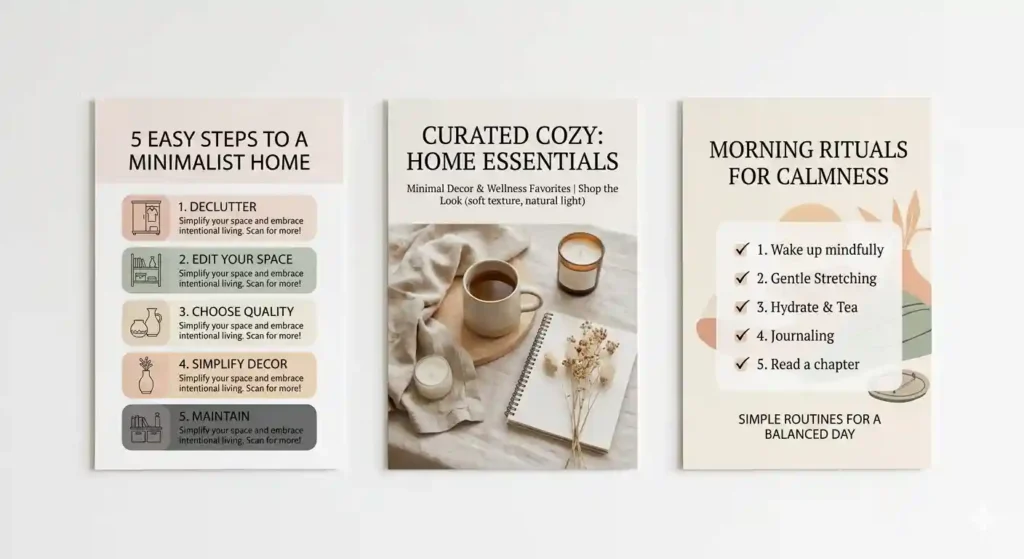
The standard pin size is 1000 x 1500 pixels (2:3 ratio). This vertical format is designed for Pinterest’s scrolling interface and performs significantly better than square or landscape images.
What makes a pin actually work?
A strong pin has four elements: a clear, high-quality image or graphic; a text overlay that tells the viewer exactly what they’re getting; a call to action (“See full guide” / “Shop now” / “Get the list”); and a consistent brand look so people start recognising your style.
The types of pins that convert best for affiliate marketing:
Infographic pins — these perform especially well because they give real value upfront. A pin titled “7 Amazon Products That Actually Organise Your Wardrobe” works far better than a plain product photo, because it teaches while it sells.
How-to pins — step-by-step visuals that lead to a more detailed blog post or product page.
List pins — “10 travel essentials under £50” or “5 tools every freelancer needs” — these get saves, which tells Pinterest your content is worth distributing further.
Video pins — in 2026, video pins are getting significantly more reach than static images. Even a 10-second simple slideshow made in Canva counts as a video pin and can dramatically increase impressions.
Create multiple pins for the same affiliate product or link — different images, different headlines, different angles. You’re not copying yourself; you’re testing what resonates with your audience.
Step 5 — Add Affiliate Links the Right Way
This is the step where people either do it right and build a sustainable income, or do it wrong and get their account banned.
You have two options for where your affiliate link goes:
Option 1 — Direct link. You paste your affiliate link directly into the pin’s destination URL. Simple, fast, no website needed. This works for most programmes, but always check your specific programme’s terms first. Amazon Associates, for example, allows direct Pinterest links.
Option 2 — Bridge page or blog post. Your pin links to a blog post or landing page on your website, which then contains the affiliate links. This approach generally converts better because you can provide more context, build trust, and even collect email addresses along the way.
If you’re starting without a website, go with Option 1. As you grow, building a simple blog as a bridge will increase your earnings.
Two things you must never do:
Never use shortened links (bit.ly, TinyURL, etc.). Pinterest flags these as spam and will limit your reach — or worse, suspend your account.
Never skip the disclosure. You are legally required — under FTC guidelines in the US and ASA rules in the UK — to disclose that your pins contain affiliate links. In your pin description, simply add: “This pin contains affiliate links. I may earn a small commission at no extra cost to you. #ad #affiliate”
This isn’t just a legal requirement. It builds trust. And on Pinterest, trust is what drives clicks.
Step 6 — Post Consistently (This Is Non-Negotiable)
Pinterest rewards consistency above almost everything else. An account that posts 15–20 pins every day will always outperform an account that posts 100 pins one week and nothing for the next two.
The recommended ratio is: 80% valuable content, 20% affiliate pins. So if you’re posting 20 pins a day, roughly 4 of them should be affiliate pins. The rest should be genuinely helpful content in your niche — tips, ideas, inspiration — that keeps people following you and coming back.
Best times to post for UK and US audiences:
- UK: 8–10pm GMT (evening browsers)
- US: 8–11pm EST / 8–11pm PST
- Weekends consistently outperform weekdays across all regions
Doing this manually every day is exhausting. Use a scheduler. Tailwind is the most popular Pinterest scheduler and it also suggests the best posting times based on your audience. There’s a free trial available.
Step 7 — Track Your Results and Double Down on What Works
Most beginners set up their account, start pinning, and then just… wait. Don’t do that.
Pinterest Analytics (free, inside your business account) shows you exactly which pins are getting impressions, saves, and — most importantly — outbound clicks. Outbound clicks are what actually drive traffic to your affiliate links.
Here’s the simple process:
Every week, look at your top 5 pins by outbound clicks. Ask yourself: what do these pins have in common? Is it the topic, the style, the headline format? Then create more pins like those.
And for pins that are getting no clicks at all — try a different image or a different headline. Sometimes one small change makes a big difference.
This isn’t complex analytics. It’s just paying attention to what’s working and doing more of it.
How Much Can You Actually Earn?
Let’s be realistic. Pinterest affiliate marketing is not a get-rich-quick scheme. But it is one of the few online income streams where your results genuinely compound over time.
Here’s what most people experience at different stages:
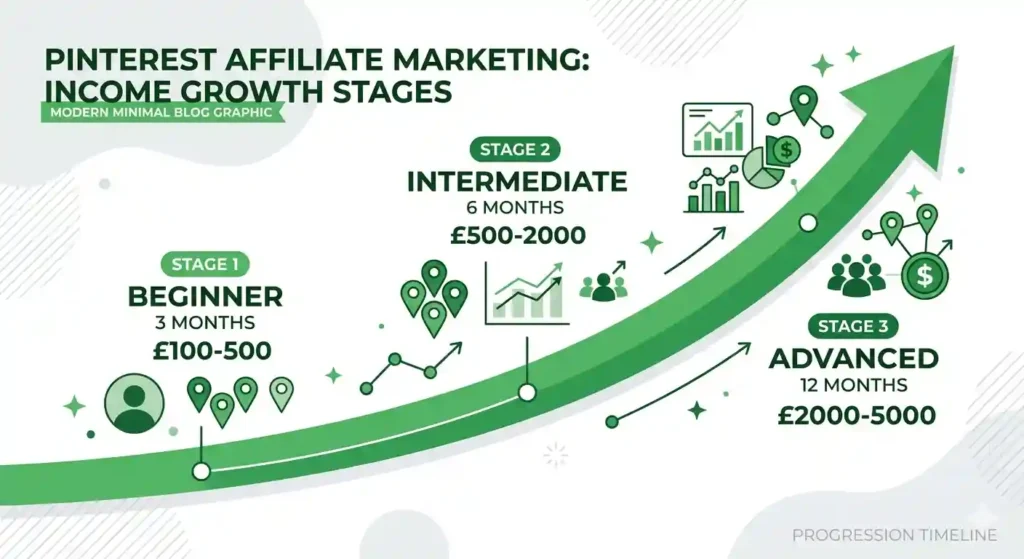
First 3 months: Building your account, testing niches, getting your first clicks. Most people earn between £0 and £100 in this phase. This is normal. You’re learning.
Months 3–6: Consistent income starts to appear. Beginners in focused niches typically see £100–£500 per month once their pins start ranking in Pinterest search.
After 12 months: With consistent posting and a growing library of pins, £1,000–£5,000 per month is achievable. At this stage, older pins are still earning while new pins are building momentum.
Top earners: Those who niche down hard, use a blog as a bridge, and build multiple boards in related niches can reach £10,000+ per month. These are the outliers, but they exist — and they started exactly where you are now.
The key variable is consistency. The accounts that fail are almost always ones that quit before the 90-day mark.
5 Mistakes That Will Kill Your Pinterest Affiliate Account
Before you go off and start pinning, there are five mistakes I see beginners make constantly. Avoiding these will save you months of frustration.
Mistake 1 — Only posting affiliate content. If every pin on your account is trying to sell something, people will stop following you and Pinterest will limit your reach. Always mix in genuine, helpful content.
Mistake 2 — Ignoring Pinterest SEO. Using keywords in your board names, pin titles, and descriptions is not optional. It’s the entire reason Pinterest will show your content to strangers.
Mistake 3 — Using shortened or cloaked links. Pinterest’s algorithm flags these immediately. Always use the full affiliate URL.
Mistake 4 — Skipping the disclosure. Even if you think no one reads it — it’s legally required in the UK, US, Canada, and across the EU. One word: #affiliate. That’s all it takes.
Mistake 5 — Stopping before 90 days. Pinterest is a slow burn at the start. Most accounts don’t gain meaningful traction until around the 3-month mark. The people who push through that period are the ones who start seeing real results.
Final Thoughts Pinterest Affiliate Marketing for Beginners
Pinterest affiliate marketing is genuinely one of the best low-cost, low-competition ways to build an income online in 2026 — especially if you’re based in the UK, Canada, or Europe where the space is still wide open.
You don’t need a big following. You don’t need a professional website. You don’t need to spend money on ads.
What you need is a business account, the right niche, a consistent pinning habit, and the patience to stick with it for at least 90 days.
Start with Step 1 today. Create your business account. Pick your niche. It costs nothing and takes ten minutes.
The pins you create this week could still be earning you commissions next year.
Frequently Asked Questions
Do I need to pay for Pinterest to do affiliate marketing?
No. A Pinterest Business Account is completely free, Pinterest Analytics is free, and you can create pins using free tools like Canva. The only optional paid tools are schedulers like Tailwind, which make managing your posting schedule easier — but they are not required, especially when you are just getting started.
Can I promote Amazon products on Pinterest in the UK and Canada?
Yes. Amazon Associates links are allowed on Pinterest and work across UK (amazon.co.uk), US (amazon.com), and Canadian (amazon.ca) storefronts. Just make sure you sign up for the correct regional Amazon Associates programme — UK creators should join the amazon.co.uk affiliate programme, Canadian creators the amazon.ca programme. Also remember that Amazon has a 24-hour cookie window, so promoting products people tend to buy quickly (gifts, everyday items, under £50) works best.
How many pins should I post per day for affiliate marketing?
Aim for 15 to 25 pins per day, keeping roughly 80% as valuable non-affiliate content and 20% as affiliate pins. So out of 20 daily pins, around 4 would contain affiliate links. Consistency matters far more than volume — an account posting 15 pins every single day will outperform one that posts 100 pins one week and nothing the next.
How long does it take to make money with Pinterest affiliate marketing?
Most beginners see their first commissions within 30 to 90 days of consistent posting. Meaningful income — think £200 to £500 per month — typically takes around 6 months. The accounts that never earn anything are almost always the ones that stopped before the 90-day mark. Pinterest is a slow build at the start, but once your pins start ranking in search, traffic compounds on its own.
Which affiliate programme is best for Pinterest beginners?
Amazon Associates is the most beginner-friendly option because the product range covers virtually every niche and people already trust Amazon enough to buy. For UK and European creators, Awin is also worth joining early — it connects you with hundreds of UK-specific brands with strong commission rates. Once you have some experience, ShareASale and Impact offer higher commissions, particularly for digital products and software.
Is Pinterest affiliate marketing allowed in the UK?
Yes, it is fully allowed in the UK. However, UK-based creators must follow ASA (Advertising Standards Authority) guidelines, which means you must clearly disclose any affiliate links in your pin descriptions. Simply adding #ad or #affiliate to your pin description keeps you compliant. The rules are very similar to FTC guidelines in the US and are easy to follow.
Can I do Pinterest affiliate marketing without a website?
Yes, absolutely. You can add affiliate links directly to your pins without owning a website at all. Pinterest allows direct affiliate links from most major programmes including Amazon Associates and ShareASale. That said, having a simple blog post as a “bridge page” does tend to increase conversions — but it’s completely optional when you’re starting out. Many beginners earn their first commissions with zero website.

Portugal Work Visa for Foreigners 2026 Why the Job Offer Must Come Before the Plane Ticket
If you were planning to fly to Lisbon on a tourist stamp and hunt for…

How to Get a Canada Work Visa from China 2026 Step-by-Step Guide
Every year, thousands of skilled professionals across China begin searching for the same thing: how…
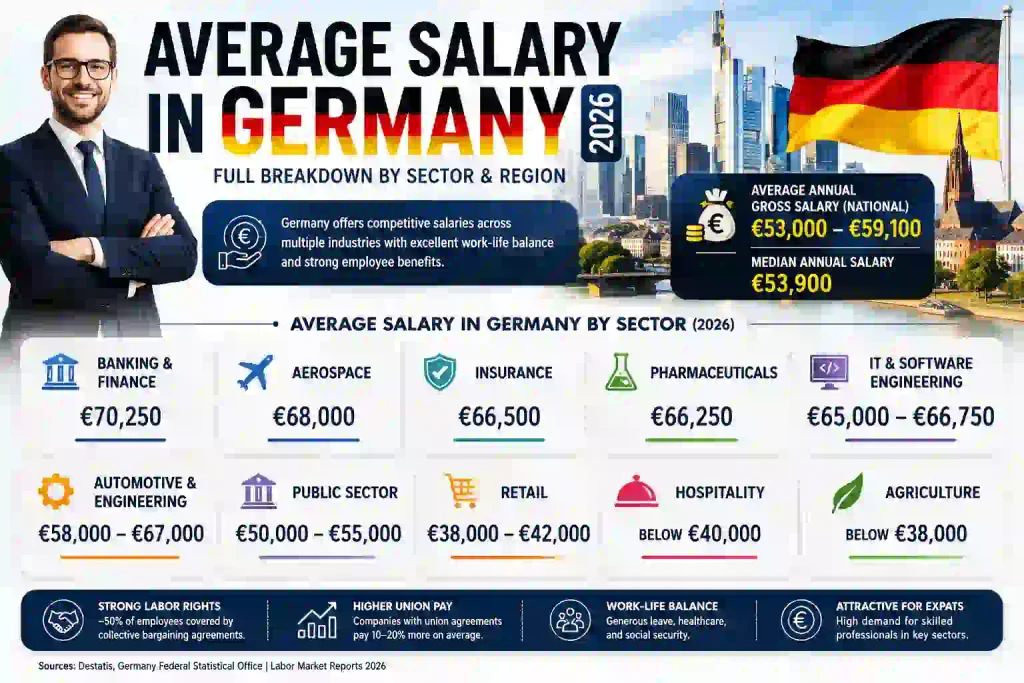
Average Salary in Germany 2026 Full Breakdown by Sector and Region
If you’re planning a move to Europe’s largest economy, one question comes up before anything…

Best Job Sites in Germany for Foreigners and Immigrants 2026
Moving to Germany for work sounds exciting until you actually sit down and start searching…

Netherlands Work Visa for Foreigners 2026: Step-by-Step Guide
Moving abroad for work is a big decision, and if the Netherlands is on your…

Virtual Assistant Jobs for Beginners 2026: How to Get Started Without Experience
The remote work industry has grown faster than anyone predicted, and one career path leading…