You applied for the job. You never heard back. You tried again. Still silence.
This is not about your experience. This is not about your degree. The truth is, your resume probably never reached a human being at all. It was stopped by software — and that software rejected it in seconds.
In 2026, 98% of companies across the UK, USA, Canada, and Europe use an Applicant Tracking System to filter resumes automatically before any recruiter sees them. If your resume is not built to pass this system, it does not matter how qualified you are. You are invisible.
This guide shows you exactly how to make an ATS resume for free — step by step — using WorkerCV’s free ATS resume builder. No sign-up, no account, no watermark, and your data is never stored anywhere.
Table of Contents
What Is an ATS Resume and Why Does It Matter in 2026
An ATS resume is a resume specifically formatted and written to be read correctly by Applicant Tracking System software. Most resumes look great to a human eye but fail completely when a machine tries to parse them.
When you apply for a job online — through Indeed, LinkedIn, Reed, Glassdoor, or a company careers page — your resume goes straight into an ATS. The software parses your document, extracts your information, scans for keywords from the job description, and gives your application a score. If your score is high enough, a recruiter sees your resume. If not, your application is automatically archived and you never hear back.
According to Jobscan, over 97% of Fortune 500 companies use ATS software to screen candidates. This is not just a US trend — employers across the UK, Canada, Germany, Netherlands, and Australia have all adopted these systems as standard hiring practice.
This is why 75% of resumes never reach a human recruiter. Not because the candidates were underqualified — but because the format or missing keywords caused the ATS to filter them out before anyone even glanced at the application.
No sign-up required · No data stored · Instant PDF download
What Makes a Resume Fail ATS Screening
Before learning how to build a proper ATS resume, you need to understand what is silently killing most applications right now.
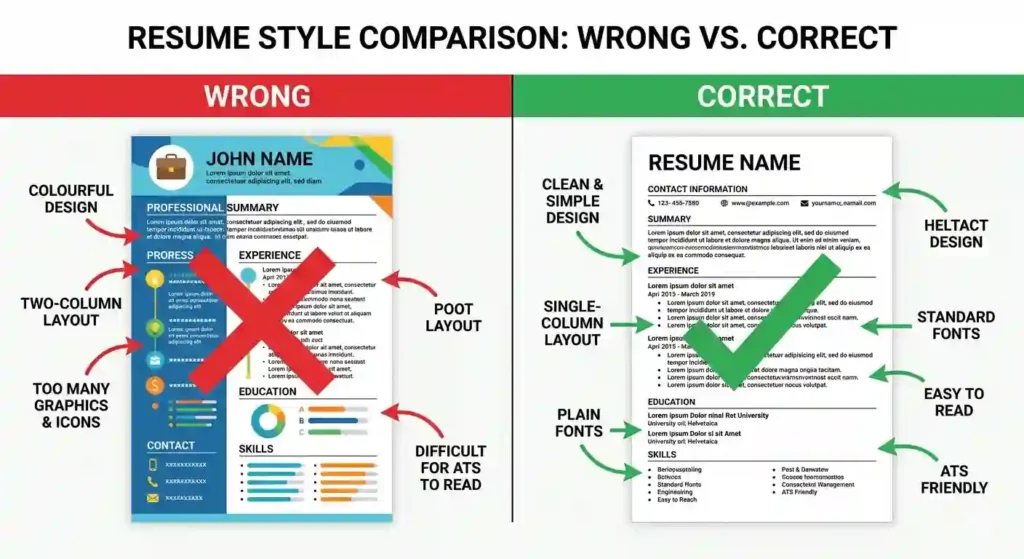
Two-column layouts are the single biggest cause of ATS failure. The software reads your document from left to right across the entire page width. When your resume has two columns, the ATS scrambles the content — mixing your job titles with your contact details and merging your skills into your education section — producing output that makes no sense to the scoring algorithm.
Tables and text boxes are another major problem. ATS parsers frequently skip over content placed inside tables and text boxes entirely. If your phone number, email address, or key skills are inside a table — which many popular resume templates use — there is a real chance the system never reads them at all.
No sign-up required · No data stored · Instant PDF download
Graphics, icons, and images are completely invisible to ATS software. Profile photos, skill bar graphics, star ratings, decorative lines, and icons next to your contact details — none of these exist as far as the ATS is concerned. The system reads only raw text.
Creative section headings confuse the parser. Headings like “My Journey,” “What I Bring,” or “Career Story” are not recognised by ATS software. The system is programmed to look for standard labels — Work Experience, Education, Skills, Certifications. Anything outside these standard terms risks being miscategorised or ignored completely.
Headers and footers are a hidden trap. Many candidates put their name and contact details in the document header. Most ATS systems cannot read header and footer content at all, which means your name and phone number may never be extracted correctly by the system.
All of these problems share one solution — using a resume builder designed specifically for ATS compatibility from the ground up.
How to Make an ATS Resume for Free Using WorkerCV
WorkerCV’s free ATS resume builder solves every one of these problems without charging you anything. There is no account to create, no email to verify, no subscription to start, and no watermark on your downloaded PDF. Your data is processed entirely in your browser using client-side technology and is never uploaded to any server — making it one of the most privacy-friendly resume tools available.
Here is exactly how to build your ATS resume for free in three steps.
Step 1 — Open WorkerCV and Start Building Immediately
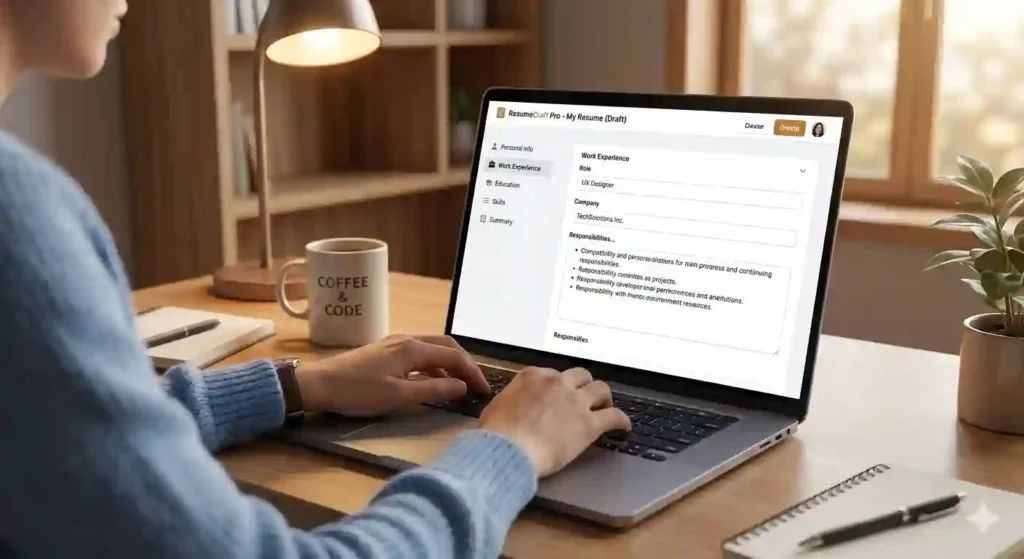
Go to WorkerCV’s free ATS resume builder. The tool opens instantly with no registration required. You will see the resume editor on one side and a live preview on the other, so you can watch your resume take shape in real time as you fill in each section.
Step 2 — Fill In Every Section the Right Way
This is where most people either win or lose their ATS score. Filling in each section correctly is just as important as using the right template.
Personal Information
Enter your full name, phone number, professional email address, and your city and country. Add your LinkedIn URL if your profile is complete and up to date. For UK applications, city and region is now the standard — you do not need your full home address. For US and Canadian applications, city and state or province is the norm.
Professional Summary
Write three to four sentences that immediately tell the ATS and the recruiter who you are professionally. This section must contain your target job title, your years of relevant experience, your two or three strongest skills, and at least one keyword pulled directly from the job description you are applying for.
A strong ATS-optimised professional summary looks like this:
“Digital marketing manager with six years of experience in SEO, paid media, and content strategy. Proven track record of growing organic traffic by over 150% for B2B SaaS companies. Seeking a senior marketing role where data-driven strategy and cross-functional collaboration drive measurable growth.”
This summary includes a specific job title, quantified results, named skills, and language that mirrors what employers actively search for. That combination is what pushes an ATS score from average to high.
Work Experience
List every relevant position in reverse chronological order, starting with your most recent role. For each position include your exact job title, the company name, the city and country, and your employment dates written as month and year — not just the year. ATS systems are specifically programmed to look for this level of date detail.
Under each role, write three to five bullet points describing what you did and what results you produced. The key word is results. Bullet points that describe tasks score poorly. Bullet points that describe outcomes score well.
A weak bullet point: “Responsible for managing the company’s social media accounts.”
A strong ATS bullet point: “Grew LinkedIn following from 3,200 to 19,000 in 11 months by implementing a weekly thought leadership content strategy, increasing inbound lead enquiries by 34%.”
The second version includes specific numbers, a named platform, a named methodology, and a measurable business result. According to Harvard Business Review, recruiters spend an average of just seven seconds on an initial resume scan — quantified achievements are the fastest way to pass both ATS scoring and that seven-second human review.
Education
List your highest qualification first. Include your degree title, institution name, and graduation year. Add any professional certifications beneath this — especially chartered qualifications, industry accreditations, or role-specific courses. For UK applications, include your A-Level results if you graduated within the last three years.
Skills
This section is the most direct way to improve your ATS keyword score. List the exact tools, technologies, methodologies, and competencies that appear in the job description. Mirror the employer’s exact language — if the posting says “Google Analytics 4,” do not write “web analytics tools.” Exact matches score highest in ATS keyword algorithms.
No sign-up required · No data stored · Instant PDF download
Step 3 — Choose Your Template and Download Your PDF
WorkerCV offers two professionally designed templates.
The Modern ATS Template uses a clean single-column layout with standard fonts, conventional section headings, and zero decorative elements. It is built specifically for the ATS systems used by major employers in the UK, USA, Canada, and Australia — including Workday, Greenhouse, Taleo, Lever, and iCIMS. This is the right choice for technology, finance, marketing, healthcare, operations, and any corporate or office-based role in English-speaking markets.
The Europass Pro Template follows the official European Union format recognised across all 27 EU member states. It includes a structured contact sidebar, a CEFR language proficiency grid, and sections for digital competencies — all features that European employers and institutions expect to see. According to Europass, this format is used by millions of job seekers across Europe and is the standard for EU work visa and Blue Card applications.
Select your template, review the live preview to confirm everything looks correct, then click Download PDF. Your resume is ready to send immediately.
Seven Proven Tips to Pass ATS Every Time
Tailor your resume for every single application. Ten minutes adjusting your summary and skills section for each role makes a measurable difference. Generic resumes that go to dozens of employers untouched perform significantly worse than tailored ones in ATS scoring.
Mirror the exact language in the job posting. If the description says “stakeholder management,” use that exact phrase — not “managing relationships” or “working with clients.” ATS systems assign highest scores to exact keyword matches, not synonyms.
Write out acronyms alongside the full term. Write “Search Engine Optimisation (SEO)” not just “SEO.” Write “Project Management Professional (PMP)” not just “PMP.” Different ATS systems search for different versions of the same term, so covering both protects your score.
Place keywords across multiple sections. ATS systems give more weight to skills that appear in the context of actual work experience than to skills listed in isolation. Put your most important keywords in your summary, inside your experience bullet points, and in your skills section.
Keep bullet points to one or two lines. Long, dense paragraphs in the experience section are harder for ATS parsers to process correctly. Short, punchy, result-focused bullet points perform better in both machine and human review.
Use standard bullet symbols only. Round bullets or dashes are safe. Checkmarks, arrows, stars, and custom symbols cause parsing errors in certain ATS platforms and should be avoided entirely.
Submit as PDF unless the employer specifies otherwise. A text-based PDF maintains your formatting perfectly across all devices and operating systems. WorkerCV’s PDF output is already ATS-readable — you can submit it directly without any additional testing or conversion.
Why WorkerCV Is the Right Choice for UK, USA, Canada, and Europe
Most free resume builders fall into one of two traps. They either prioritise visual design over ATS compatibility — producing beautiful resumes that fail automated screening — or they are technically free but hide features behind a paywall at the point of download.
WorkerCV does neither. The tool is built around a single principle: give job seekers in every market a professionally formatted, ATS-optimised resume with no barriers whatsoever.
No sign-up. No subscription. No watermark. No data stored. No cost at any stage.
For job seekers in the UK applying through Reed or Totaljobs, candidates in the USA submitting through LinkedIn or Indeed, professionals in Canada using Workopolis or Monster, or skilled workers across Europe targeting roles on EURES or local job boards — the WorkerCV free ATS resume builder gives you a resume that works in every market, built in minutes, downloaded instantly.
Is WorkerCV’s ATS resume builder really free?
Yes, completely. There are no hidden charges, no premium plans, no watermarks, and no payment required at any stage — including the PDF download. Every feature is free from start to finish.
Do I need to create an account or sign up?
No. WorkerCV requires zero registration. No email address, no password, no account creation of any kind. You open the tool, fill in your details, and download your resume. That is the entire process.
Will my personal data be saved or stored anywhere?
No. WorkerCV uses client-side technology, which means everything you type is processed only inside your browser. Nothing is uploaded to any server and nothing is stored in any database. Once you close the tab, your data is gone completely.
Which template should I use — Modern ATS or Europass Pro?
If you are applying for jobs in the UK, USA, Canada, or Australia, use the Modern ATS template. It is optimised for the ATS systems used by major English-speaking market employers. If you are applying for jobs in Europe — Germany, France, Netherlands, Spain, or any other EU country — use the Europass Pro template, which follows official EU standards and is recognised across all 27 member states.
Can I use this resume for jobs in multiple countries?
Yes. Simply switch between the two templates depending on where you are applying. Your content stays the same — only the format changes. The Modern ATS template works for English-speaking markets and the Europass Pro template covers the entire European job market.